Check before you open
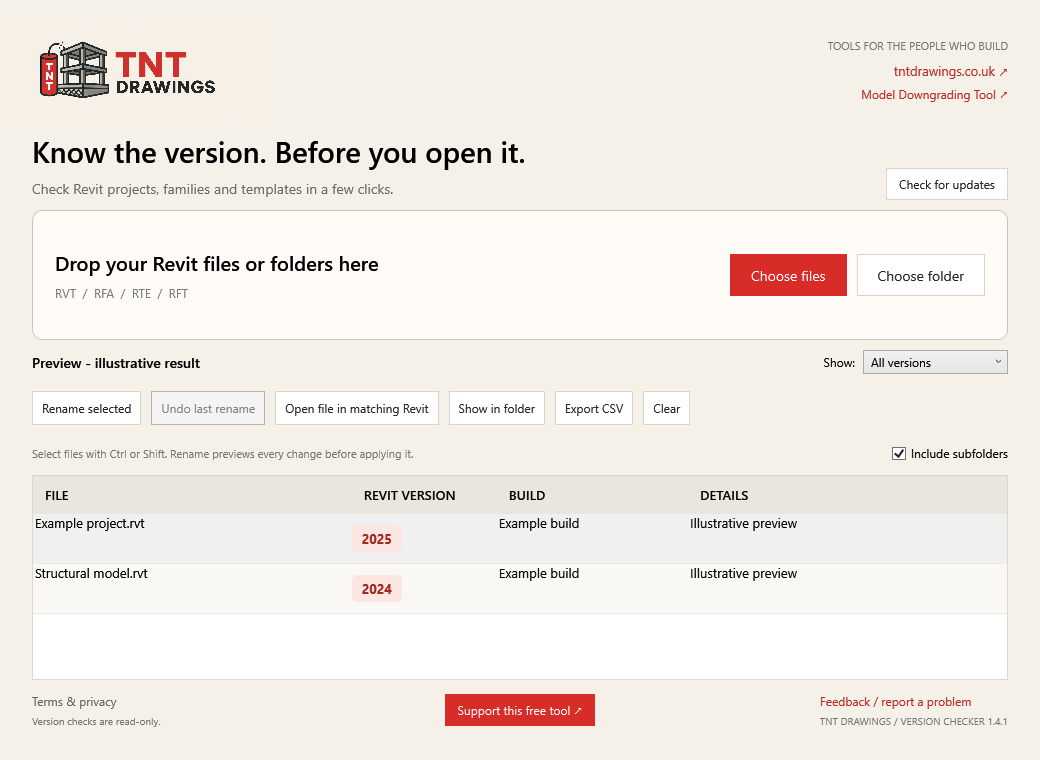
Right-click a file or drop in a whole folder. See the saved Revit year and build without loading the model in Revit.
TNT DRAWINGS / FREE DESKTOP TOOLS
Revit Version Checker
A small tool for a familiar Revit headache. Check the saved version, add a clear filename suffix, and get on with your drawings.
Download for WindowsFree for personal and business use. No account needed.
Version 1.4.1 · 2.4 MB · Released 28 October 2026
01 / THE EVERYDAY BITS
Built by TNT Drawings for the files that pass through a Revit technician’s day.
Right-click a file or drop in a whole folder. See the saved Revit year and build without loading the model in Revit.
Turn Project.rvt into Project-R24.rvt. Preview one file or a batch. Existing suffixes and filename clashes are checked.
Restore the original filenames for the last rename or batch in your current window. Modified or conflicting files are skipped.
Launch a file in the same Revit release it was saved in. The tool checks installed executables and never chooses a newer release automatically.
Show files from a particular Revit year, jump to a file in Explorer, and export the visible results to CSV.
No accounts, subscriptions or in-app uploads. Feedback and optional update checks are a click away. All features remain free.
02 / GET STARTED
Close an older copy before updating. Run the new installer to replace it in place.
Use the button on this page. Keep Windows security protections enabled.
Choose whether to add a desktop shortcut. The installer also adds a Start menu shortcut and a Revit-file right-click option.
Right-click → Check Revit version with TNT Drawings. On Windows 11, use Show more options first. You can also choose files or folders inside the app.
Close models first. Renaming may affect Revit links and worksharing references. Follow your project’s procedures for central models and backups. Undo lasts only while the current app window is open. Version identification does not establish model integrity or compatibility.
03 / RELEASE NOTES
Use Check for updates in the app to check the latest release. It opens this page when there is a newer version; nothing installs automatically.
CD6C4B1EB82F556D9B1BC6B1D242B618D0258D11F5848497E4B9D2D3770D8307Download checksumTNT-branded app and taskbar identity, feedback email, manual update checks and offline Terms & Privacy window.
Version 1.4.0 ZIP ↓Batch rename previews, session undo, matching Revit launch, folder shortcuts, version filters and the external downgrading-tool warning.
Previous release ZIP ↓Standalone version checking, direct metadata-stream reading, TNT branding, installer and filename version suffixes.
04 / GOOD TO KNOW
No. Version checking reads metadata. Renaming is a separate action that previews filename changes before confirmation; it does not edit or upgrade model contents.
The tool could not confidently read the saved-version metadata. It will not guess or rename that file. Check that it is available locally and readable. Some files or layouts may not be supported.
Open file in matching Revit starts the correct release without loading a workshared model. Use Revit’s own Open dialog to choose the appropriate local or central options.
The app does not upload models or scan results. Clicking Check for updates requests a public version record from TNT’s website; hosting may receive ordinary connection information such as your IP address. Feedback opens an email draft for you to review and send.
No. Model Downgrading Tool is a link to RVT Convert, an independent service that claims to downgrade newer Revit files to Revit 2023. TNT Drawings has not verified its conversion results. The app shows a warning before opening that website and uploads no files to it.
Close the app, then use Windows Settings → Apps, or Uninstall.exe in the installation folder. Your Revit files and exported reports are kept.
MADE BY TNT DRAWINGS
Found a problem or have a sensible improvement in mind? Feedback helps us keep this little tool useful.
Send feedbackIf this tool has saved you some time, you can chuck a few quid towards keeping it going and building more useful little tools.
Support this free tool Opens Ko-fi in a new tab. Completely optional. All features stay free.Ko-fi privacy notice ↗